エラー処理
Error Handling Cheat Sheet
- 原典
- Error Handling Cheat Sheet(OWASP Cheat Sheet Series)
- 原文
- GitHub 上の Markdown
- 底本
bac04fb5(2026-07-29 時点)- ライセンス
- CC BY-SA 4.0(原典と同一。訳文も同ライセンスで再配布できます)
はじめに
エラー処理は、アプリケーション全体のセキュリティの一部である。 映画の中を除けば、攻撃は必ず偵察の段階から始まる。 攻撃者は標的について、アプリケーションサーバー、フレームワーク、ライブラリなどの技術情報(多くは名前とバージョン)をできるだけ多く集めようとする。
処理されていないエラーは、この最初の段階を助けてしまう。 その段階は、攻撃のその後にとって非常に重要である。
攻撃の各段階の説明はこの記事にある。
背景
エラー処理の水準における問題は、標的についての多くの情報を露出させうる。 また標的の機能におけるインジェクションの地点を特定するのにも使われる。
以下は、利用者に描画された例外を通じて技術スタック(ここでは Struts2 と Tomcat のバージョン)が露出する例である。
HTTP Status 500 - For input string: "null"

type Exception report

message For input string: "null"

description The server encountered an internal error that prevented it from fulfilling this request.

exception

java.lang.NumberFormatException: For input string: "null"
    java.lang.NumberFormatException.forInputString(NumberFormatException.java:65)
    java.lang.Integer.parseInt(Integer.java:492)
    java.lang.Integer.parseInt(Integer.java:527)
    sun.reflect.NativeMethodAccessorImpl.invoke0(Native Method)
    sun.reflect.NativeMethodAccessorImpl.invoke(NativeMethodAccessorImpl.java:57)
    sun.reflect.DelegatingMethodAccessorImpl.invoke(DelegatingMethodAccessorImpl.java:43)
    java.lang.reflect.Method.invoke(Method.java:606)
    com.opensymphony.xwork2.DefaultActionInvocation.invokeAction(DefaultActionInvocation.java:450)
    com.opensymphony.xwork2.DefaultActionInvocation.invokeActionOnly(DefaultActionInvocation.java:289)
    com.opensymphony.xwork2.DefaultActionInvocation.invoke(DefaultActionInvocation.java:252)
    org.apache.struts2.interceptor.debugging.DebuggingInterceptor.intercept(DebuggingInterceptor.java:256)
    com.opensymphony.xwork2.DefaultActionInvocation.invoke(DefaultActionInvocation.java:246)
    ...

note: The full stack trace of the root cause is available in the Apache Tomcat/7.0.56 logs.
以下は、SQL クエリのエラーがサイトの設置パスとともに露出し、インジェクションの地点を特定するのに使える例である。
Warning: odbc_fetch_array() expects parameter /1 to be resource, boolean given
in D:\app\index_new.php on line 188
アプリケーションから技術情報を得るさまざまな手法は OWASP Testing Guide にある。
目的
この記事は、アプリケーションの実行時設定の一部として大域的なエラーハンドラを構成する方法を示す。 場合によっては、このエラーハンドラをコードの一部として定義するほうが効率的なこともある。 いずれにせよ目指す結果は、予期しないエラーが起きたときにアプリケーションが一般的な応答を返し、エラーの詳細は調査のためにサーバー側で記録され、利用者には返されない状態である。
以下の図が目指す構成を示す。
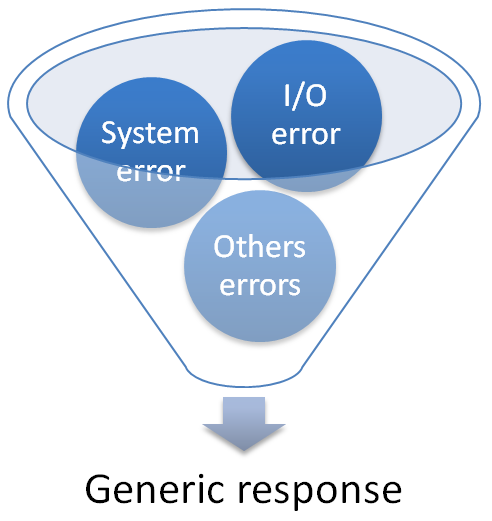
最近のアプリケーションの構成はほとんどがAPI に基づくものなので、この記事ではバックエンドが REST API のみを公開し、ユーザーインタフェースのコンテンツを含まないと仮定する。 アプリケーションは、ありうる障害の形態をすべて網羅するよう努めるべきである。 5xx のエラーは、応じられないリクエストへの応答を示す場合にのみ用い、実装の詳細を露出させる内容を応答に含めない。 そのための文書形式は RFC 7807 - Problem Details for HTTP APIs が定義している。
エラーの記録そのものについてはログを参照する。 この記事はエラー処理の部分に主眼を置く。
提案
技術スタックごとに、以下の設定を提案する。
標準的な Java の Web アプリケーション
この種のアプリケーションでは、大域的なエラーハンドラを web.xml のデプロイメント記述子のレベルで構成できる。
ここでは Servlet 仕様のバージョン 2.5 以降で使える設定を提案する。
この設定では、予期しないエラーはすべて error.jsp へのリダイレクトを引き起こし、そこでエラーが記録されて一般的な応答が返される。
web.xml ファイルにおけるリダイレクトの設定を示す。
<?xml version="1.0" encoding="UTF-8"?>
<web-app xmlns:xsi="http://www.w3.org/2001/XMLSchema-instance" ns="http://java.sun.com/xml/ns/javaee"
xsi:schemaLocation="http://java.sun.com/xml/ns/javaee http://java.sun.com/xml/ns/javaee/web-app_3_0.xsd"
version="3.0">
...
    <error-page>
        <exception-type>java.lang.Exception</exception-type>
        <location>/error.jsp</location>
    </error-page>
...
</web-app>
error.jsp ファイルの内容を示す。
<%@ page language="java" isErrorPage="true" contentType="application/json; charset=UTF-8"
    pageEncoding="UTF-8"%>
<%
String errorMessage = exception.getMessage();
//Log the exception via the content of the implicit variable named "exception"
//...
//We build a generic response with a JSON format because we are in a REST API app context
//We also add an HTTP response header to indicate to the client app that the response is an error
response.setHeader("X-ERROR", "true");
//Note that we're using an internal server error response
//In some cases it may be prudent to return 4xx error codes, when we have misbehaving clients
response.setStatus(500);
%>
{"message":"An error occur, please retry"}
Java の SpringMVC/SpringBoot の Web アプリケーション
SpringMVC や SpringBoot では、次のクラスをプロジェクトに実装することで大域的なエラーハンドラを定義できる。 Spring Framework 6 は RFC 7807 に基づく problem details を導入した。
@ExceptionHandler のアノテーションによって、java.lang.Exception を継承する例外がアプリケーションから投げられたときにハンドラが働くように指示する。 応答オブジェクトの生成には ProblemDetail クラスを使う。
import org.springframework.http.HttpStatus;
import org.springframework.http.ProblemDetail;
import org.springframework.web.bind.annotation.ExceptionHandler;
import org.springframework.web.bind.annotation.RestControllerAdvice;
import org.springframework.web.context.request.WebRequest;
import org.springframework.web.servlet.mvc.method.annotation.ResponseEntityExceptionHandler;

/**
 * Global error handler in charge of returning a generic response in case of unexpected error situation.
 */
@RestControllerAdvice
public class RestResponseEntityExceptionHandler extends ResponseEntityExceptionHandler {

    @ExceptionHandler(value = {Exception.class})
    public ProblemDetail handleGlobalError(RuntimeException exception, WebRequest request) {
        //Log the exception via the content of the parameter named "exception"
        //...
        //Note that we're using an internal server error response
        //In some cases it may be prudent to return 4xx error codes, if we have misbehaving clients
        //By specification, the content-type can be "application/problem+json" or "application/problem+xml"
        return ProblemDetail.forStatusAndDetail(HttpStatus.INTERNAL_SERVER_ERROR, "An error occur, please retry");
    }
}
参考資料
ASP.NET Core の Web アプリケーション
ASP.NET Core では、例外ハンドラを専用の API コントローラとして指定することで大域的なエラーハンドラを定義できる。
エラー処理専用の API コントローラの内容を示す。
using Microsoft.AspNetCore.Authorization;
using Microsoft.AspNetCore.Diagnostics;
using Microsoft.AspNetCore.Mvc;
using System;
using System.Collections.Generic;
using System.Net;

namespace MyProject.Controllers
{
    /// <summary>
    /// API Controller used to intercept and handle all unexpected exception
    /// </summary>
    [Route("api/[controller]")]
    [ApiController]
    [AllowAnonymous]
    public class ErrorController : ControllerBase
    {
        /// <summary>
        /// Action that will be invoked for any call to this Controller in order to handle the current error
        /// </summary>
        /// <returns>A generic error formatted as JSON because we are in a REST API app context</returns>
        [HttpGet]
        [HttpPost]
        [HttpHead]
        [HttpDelete]
        [HttpPut]
        [HttpOptions]
        [HttpPatch]
        public JsonResult Handle()
        {
            //Get the exception that has implied the call to this controller
            Exception exception = HttpContext.Features.Get<IExceptionHandlerFeature>()?.Error;
            //Log the exception via the content of the variable named "exception" if it is not NULL
            //...
            //We build a generic response with a JSON format because we are in a REST API app context
            //We also add an HTTP response header to indicate to the client app that the response
            //is an error
            var responseBody = new Dictionary<String, String>{ {
                "message", "An error occur, please retry"
            } };
            JsonResult response = new JsonResult(responseBody);
            //Note that we're using an internal server error response
            //In some cases it may be prudent to return 4xx error codes, if we have misbehaving clients
            response.StatusCode = (int)HttpStatusCode.InternalServerError;
            Request.HttpContext.Response.Headers.Remove("X-ERROR");
            Request.HttpContext.Response.Headers.Add("X-ERROR", "true");
            return response;
        }
    }
}
アプリケーションの Startup.cs ファイルにおいて、例外ハンドラをエラー処理専用の API コントローラへ対応づける定義を示す。
using Microsoft.AspNetCore.Builder;
using Microsoft.AspNetCore.Hosting;
using Microsoft.AspNetCore.Mvc;
using Microsoft.Extensions.Configuration;
using Microsoft.Extensions.DependencyInjection;

namespace MyProject
{
    public class Startup
    {
...
        public void Configure(IApplicationBuilder app, IHostingEnvironment env)
        {
            //First we configure the error handler middleware!
            //We enable the global error handler in others environments than DEV
            //because debug page are useful during implementation
            if (env.IsDevelopment())
            {
                app.UseDeveloperExceptionPage();
            }
            else
            {
                //Our global handler is defined on "/api/error" URL so we indicate to the
                //exception handler to call this API controller
                //on any unexpected exception raised by the application
                app.UseExceptionHandler("/api/error");

                //To customize the response content type and text, use the overload of
                //UseStatusCodePages that takes a content type and format string.
                app.UseStatusCodePages("text/plain", "Status code page, status code: {0}");
            }

            //We configure others middlewares, remember that the declaration order is important...
            app.UseMvc();
            //...
        }
    }
}
参考資料
ASP.NET Web API の Web アプリケーション
(.NET Core ではなく標準の .NET Framework の)ASP.NET Web API では、アプリケーションで発生したエラーを記録して処理するハンドラを定義し、登録できる。
エラーの詳細を記録するハンドラの定義を示す。
using System;
using System.Web.Http.ExceptionHandling;

namespace MyProject.Security
{
    /// <summary>
    /// Global logger used to trace any error that occurs at application wide level
    /// </summary>
    public class GlobalErrorLogger : ExceptionLogger
    {
        /// <summary>
        /// Method in charge of the management of the error from a tracing point of view
        /// </summary>
        /// <param name="context">Context containing the error details</param>
        public override void Log(ExceptionLoggerContext context)
        {
            //Get the exception
            Exception exception = context.Exception;
            //Log the exception via the content of the variable named "exception" if it is not NULL
            //...
        }
    }
}
一般的な応答を返すためにエラーを処理するハンドラの定義を示す。
using Newtonsoft.Json;
using System;
using System.Collections.Generic;
using System.Net;
using System.Net.Http;
using System.Text;
using System.Threading;
using System.Threading.Tasks;
using System.Web.Http;
using System.Web.Http.ExceptionHandling;

namespace MyProject.Security
{
    /// <summary>
    /// Global handler used to handle any error that occurs at application wide level
    /// </summary>
    public class GlobalErrorHandler : ExceptionHandler
    {
        /// <summary>
        /// Method in charge of handle the generic response send in case of error
        /// </summary>
        /// <param name="context">Error context</param>
        public override void Handle(ExceptionHandlerContext context)
        {
            context.Result = new GenericResult();
        }

        /// <summary>
        /// Class used to represent the generic response send
        /// </summary>
        private class GenericResult : IHttpActionResult
        {
            /// <summary>
            /// Method in charge of creating the generic response
            /// </summary>
            /// <param name="cancellationToken">Object to cancel the task</param>
            /// <returns>A task in charge of sending the generic response</returns>
            public Task<HttpResponseMessage> ExecuteAsync(CancellationToken cancellationToken)
            {
                //We build a generic response with a JSON format because we are in a REST API app context
                //We also add an HTTP response header to indicate to the client app that the response
                //is an error
                var responseBody = new Dictionary<String, String>{ {
                    "message", "An error occur, please retry"
                } };
                // Note that we're using an internal server error response
                // In some cases it may be prudent to return 4xx error codes, if we have misbehaving clients
                HttpResponseMessage response = new HttpResponseMessage(HttpStatusCode.InternalServerError);
                response.Headers.Add("X-ERROR", "true");
                response.Content = new StringContent(JsonConvert.SerializeObject(responseBody),
                                                     Encoding.UTF8, "application/json");
                return Task.FromResult(response);
            }
        }
    }
}
アプリケーションの WebApiConfig.cs ファイルにおける両ハンドラの登録を示す。
using MyProject.Security;
using System.Web.Http;
using System.Web.Http.ExceptionHandling;

namespace MyProject
{
    public static class WebApiConfig
    {
        public static void Register(HttpConfiguration config)
        {
            //Register global error logging and handling handlers in first
            config.Services.Replace(typeof(IExceptionLogger), new GlobalErrorLogger());
            config.Services.Replace(typeof(IExceptionHandler), new GlobalErrorHandler());
            //Rest of the configuration
            //...
        }
    }
}
Web.config ファイルの <system.web> ノードの中に、次のように customErrors の節を設定する。
<configuration>
    ...
    <system.web>
        <customErrors mode="RemoteOnly"
                      defaultRedirect="~/ErrorPages/Oops.aspx" />
        ...
    </system.web>
</configuration>
参考資料
試作の出典
適切な設定を見つけるために作られたすべての実験プロジェクトのソースコードは、この GitHub リポジトリにある。
付録。HTTP のエラー
HTTP のエラーの参考資料は RFC 2616 にある。 情報の漏出を避けるには、実装の詳細を与えないエラーメッセージを使うことが重要である。 一般に、HTTP クライアント側の誤りに起因するリクエスト(認可されていないアクセス、リクエスト本体が大きすぎるなど)には 4xx のエラーコードを、予期しない不具合によってサーバー側で引き起こされたエラーには 5xx を用いることを検討する。 5xx のエラーはアプリケーションが特定の入力群に対して失敗していることを示す良い手がかりなので、それが監視されている状態にする。